-

Streamline integration
-

Resolve issues expertly
-
Optimize productivity

Microsoft 365 Services
-
Microsoft 365 Integration and Setup
Transition to Microsoft 365 seamlessly, with the correct settings and complete data migration

-
24/7 User Support
Our around-the-clock assistance addresses user concerns and solves Microsoft 365 issues fast

-
Data Security and Compliance
We safeguard your sensitive data and help you comply with data protection regulations
-
Email Management and Filtering
Communicate efficiently by optimizing your environment with spam filtering and email archiving

-
Software Updates and Patch Management
We handle software updates and patches to keep Microsoft 365 apps secure and up to date

-
Proactive Monitoring and Issue Prevention
We monitor your Microsoft 365 environment, preventing issues that could impact your operations

Does Microsoft 365 Feel Like a Circus?
- Does it feel like you’re jumping through hoops to handle the complexities of Microsoft 365?
- Are you concerned about the potential financial loss and productivity drain caused by Microsoft 365 issues?
- Does staying on top of Microsoft 365 updates and user concerns feel like trying to juggle flaming torches?
Calm the chaos: Partner with SynchroNet for Microsoft 365 IT support solutions.
We’ll Be Your Ringleader
Here are just a few of the Erie cyber security services we offer:
We understand the high-wire act our clients must perform daily. The unceasing challenges, potential missteps and the ongoing balancing act of productivity and security can be overwhelming.
At SynchroNet, we’re dedicated to being the steady hand that ensures your Microsoft 365 environment runs smoothly and securely, allowing you to enjoy the show without fear of a mishap.
-
Repeat IT issues cut by 60 percent after 3 - 6 months
-
60-day “no questions asked” refund policy
-
80 + businesses trust SynchroNet for IT services

SynchroNet Customers Say




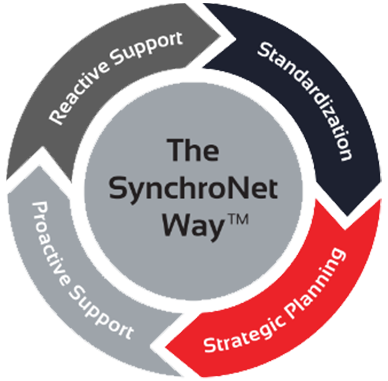
The SynchroNet Way
Want to move your business IT from the wild, wild West to an island of serenity? We get it, and we’ve helped transform everyday work life for hundreds of clients using The SynchroNet Way.
With our approach you get:
-
Standardization and a 100-point Best Practices checklist assigned to a dedicated network administrator.
-
Strategic planning at an executive level with a dedicated vCIO that keeps you on track for the long run.
-
Proactive support that monitors and protects your systems around the clock.
-
Reactive support from our friendly and caring customer support team who are always on the lookout for repeat issues.

Don't Roll the Dice With Microsoft 365 IT Support

Microsoft 365 is a major investment for businesses of all sizes. Without the right Microsoft IT support you could sacrifice your return on that investment and undercut your productivity.
Don't leave your business's success to chance. Make Microsoft 365 work harder for your team with our help.
FAQs
Microsoft 365 is a cloud-based productivity platform that provides email, file storage, collaboration tools and business applications through internet-connected services. Microsoft 365 IT Support helps Western New York businesses securely access Outlook, Teams, SharePoint and business data from virtually any location, making remote and hybrid work more efficient.
Microsoft 365 remote work capabilities include:
- Cloud-based access: Outlook, Teams, SharePoint and OneDrive are accessible from any device with secure authentication.
- Real-time collaboration: Multiple users can edit Word, Excel and PowerPoint documents simultaneously using SharePoint Online and OneDrive and eliminating version control problems.
- Identity-based security: Multi-factor authentication (MFA) helps protect Microsoft 365 accounts from unauthorized access, even when passwords are compromised.
- Device independence: Employees can work across laptops, desktops and mobile devices without relying on a local office server, supporting hybrid and distributed work environments.
- Continuous availability: Microsoft’s cloud infrastructure helps maintain access to communication and collaboration tools during local outages or office disruptions.
To understand how Microsoft 365 compares on security, visit our Microsoft 365 page or read our answer to this related question: Is Microsoft 365 more secure than traditional on-site email servers?
Yes. Microsoft 365 IT Support includes cloud-scale security infrastructure, continuous threat monitoring and identity-based access controls that most on-premises email server environments cannot replicate at a comparable cost. Microsoft also applies security updates at the platform level, helping organizations maintain a stronger security posture against evolving threats.
Microsoft 365 security protections include:
- Multi-layer encryption: Data is protected at rest and in transit using technologies such as TLS (Transport Layer Security) and AES encryption, helping support compliance and data protection requirements.
- Conditional access policies: Identity and Access Management (IAM) controls evaluate user risk, device health and location before granting access to Microsoft 365 resources.
- Microsoft Defender threat detection: Microsoft Defender analyzes email content and file activity for phishing, malware and suspicious behavior patterns before they reach users.
- Automated platform patching: Security updates are applied at the Microsoft platform level without manual server maintenance, removing the patch lag that creates exploitable vulnerabilities.
- Anomalous login response: If a login attempt appears suspicious based on user behavior, location or device information, then Microsoft 365 can require additional verification or block access automatically.
To see how SynchroNet maximizes your Microsoft 365 investment, visit our Microsoft 365 page or read our answer to this related question: How can SynchroNet help my business get more from a Microsoft 365 subscription?
Microsoft 365 IT Support helps businesses maximize the value of Microsoft 365 through proper configuration, security management, user support and ongoing optimization. SynchroNet helps ensure Microsoft 365 tools align with your business requirements while improving productivity, strengthening security and reducing administrative burden.
SynchroNet’s Microsoft 365 optimization services include:
- Tenant configuration management: Exchange Online, Teams, SharePoint and OneDrive are configured with appropriate security settings, permissions and sharing policies to support business operations.
- User lifecycle management: Secure onboarding and offboarding ensures new employees have the right access when they join the organization and that access is removed promptly when employment ends.
- Security hardening: Multi-factor authentication (MFA), conditional access policies and email security controls help reduce risk and strengthen the Microsoft 365 environment.
- Performance monitoring: Ongoing oversight of Microsoft 365 service health and user experience across all applications identifies issues before they affect productivity.
- Dedicated helpdesk support: Rapid resolution of email, login and collaboration issues helps employees stay productive, minimizing downtime caused by technical problems.
To see the full range of support SynchroNet provides, visit our Microsoft 365 page or read our answer to this related question: Is Microsoft 365 more secure than traditional on-site email servers?